What happened
Somebody is sending emails to our clients pretending to be us. We would rather show you the thing itself than write a vague warning about staying vigilant, so here it is, with the giveaways circled.
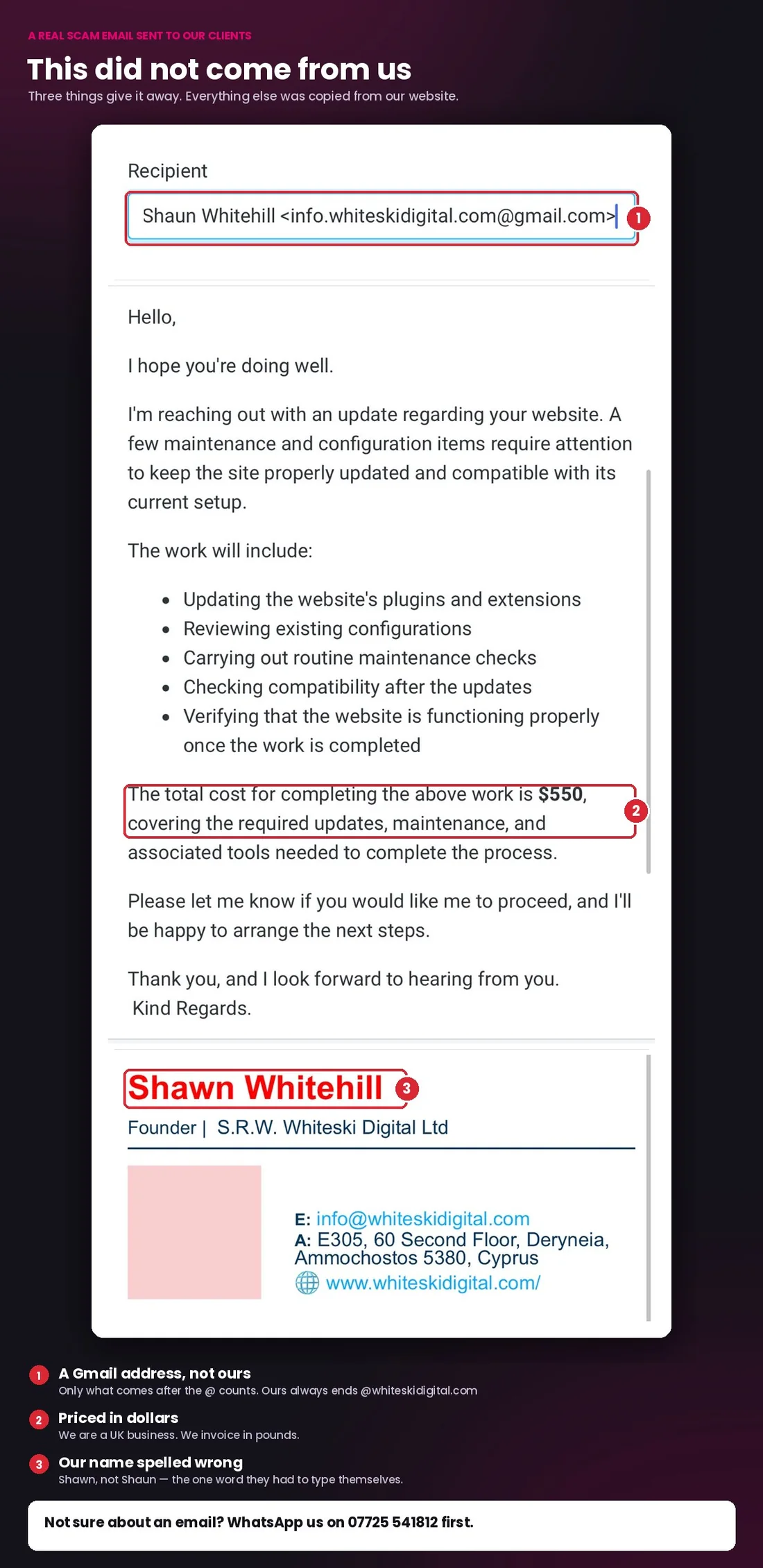
The actual email, sent to one of our clients. Everything correct in it was copied from our website.
It opens with “I hope you’re doing well.” It says a few maintenance and configuration items need attention on your website. It lists five plausible jobs — updating plugins, reviewing configurations, checking compatibility. Then it asks for $550 and offers to get started.
It is signed Shawn Whitehill, Founder, S.R.W. Whiteski Digital Ltd, with our real office address, our real email address and a link to our real website.
That is a decent effort. It is not full of spelling mistakes. It does not threaten anybody. It reads like a normal email from a supplier, because that is exactly what it was written to be.
So what gives it away?
Three things, and all three are worth knowing for any email, not just ours.
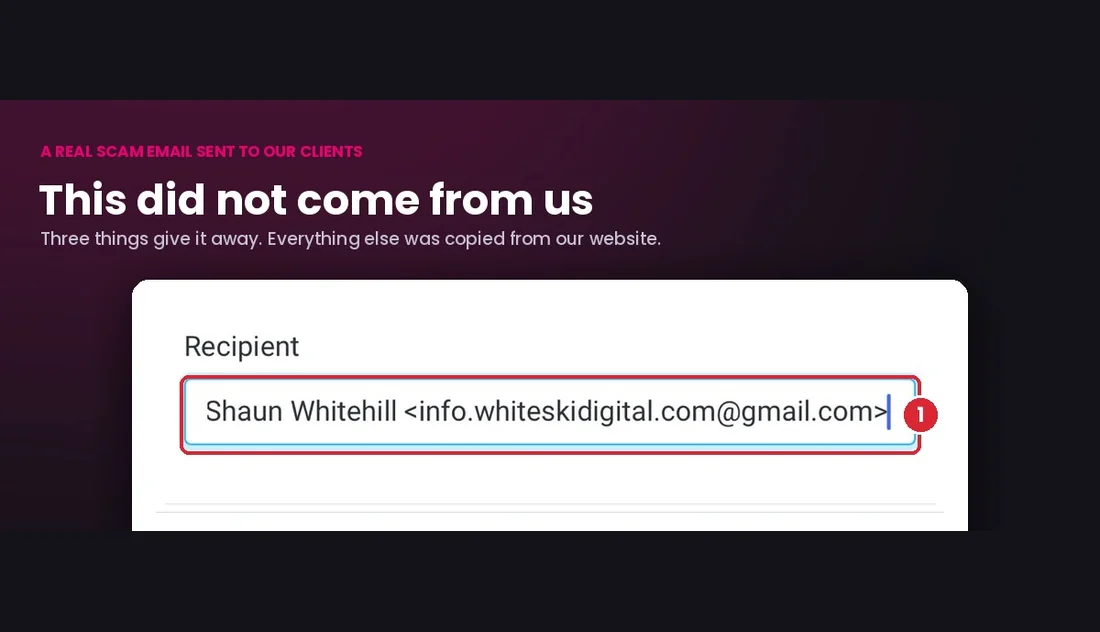
The address is a Gmail account. It comes from
info.whiteskidigital.com@gmail.com. Read quickly, the part before the @
looks like our website. But everything before the @ is just a username — anyone
can type anything there. The only part that means anything is what comes
after the @, and that is gmail.com. Our email only ever ends
@whiteskidigital.com.
It asks for dollars. We are a UK business invoicing UK clients. We bill in pounds, always.
They spelled the name wrong. Shawn, not Shaun.
That last one generalises, and it is the most useful thing in this article. Look at what is right and what is wrong in that email. The address, the company name, the website, the office — all correct, because all of it was copied from our website in about thirty seconds. The two things they had to write themselves, the name and the currency, are both wrong.
Scammers get the copied parts right and the written parts wrong. Once you know to look for that split, these get much easier to spot.
And it names nothing. No mention of your actual website, no dates, no reference to anything genuinely done for you. Real emails from a supplier talk about your business, because they know it.
Why does email let this happen?
Because email was designed in the 1970s to move messages between trusted university computers, and nobody built in a way to prove who sent something. The sender name on an email is about as reliable as the name written on the back of an envelope.
Three things have made it worse lately.
Everything is public. We list our clients on our own website, with links to their sites. That is normal for an agency, and it is almost certainly how these people found who to email. Company directors and addresses are free to look up at Companies House. Staff names and job titles are on LinkedIn. Building a convincing impersonation takes an afternoon.
The writing is good now. The old advice — watch for bad grammar and odd phrasing — is finished. Anyone can produce fluent business English instantly. Judge an email on what it asks you to do, not on how well it is written.
The amounts are sensible. Nobody asks for £40,000. They ask for $550, because $550 is small enough that you might pay it just to make the job go away.
What are the checks worth doing?
Four, and none of them take more than a few seconds.
- Check the address, not the name. On a phone, tap the sender name to expand it. Read right to left from the @. A real email from your bank ends in the bank’s own domain, not something that merely contains it.
- Look at a link before clicking. Hover on a computer, press and hold on a phone, and the real destination appears. If the text says one thing and the address says another, stop.
- Be suspicious of urgency. “Today”, “final notice”, “your account will be suspended”. Urgency exists to stop you checking. Any legitimate business will wait while you verify something.
- Verify money requests on a different channel. Confirm by a route that did not come from the email — a number you already had, a message thread you have used before. Never the reply button, and never a number printed in the suspicious email itself.
What is the one rule that prevents the expensive version?
Never accept a change of bank details by email.
Invoice redirection is the costly one. Someone gets into an email thread — often at a supplier rather than at you — and sends an invoice that looks entirely normal, with different account details. The work was real. The invoice was expected. Only the account number changed.
Make it a rule: any change of payment details is confirmed by phone, on a number you already had, before a penny moves. Tell whoever pays your invoices the same. It takes one call and it closes the whole category.
For our part: we will never email you new bank details, or ask you to send payment to a different account. If you ever get that from us, it is not us.
What should you do if you have already clicked or paid?
Move quickly, and do not let embarrassment slow you down. Speed matters far more.
- If you paid, ring your bank immediately. Most major UK banks can be reached on 159, a short number that connects you to your own bank’s fraud team.
- If you entered a password, change it on that account and anywhere else you used it, and turn on two-factor authentication.
- Report the email by forwarding it to report@phishing.gov.uk, run by the National Cyber Security Centre. Suspicious text messages go to 7726.
- Report the fraud to Action Fraud on 0300 123 2040.
- Tell whoever else might get it. If someone is impersonating you, your contacts are the targets, and a two-line warning is worth more than any filter.
Nobody should be in trouble for reporting this. People lose money by staying quiet for a day.
What can be done at our end?
Less than you might hope, and it is worth being straight about that.
Three email standards — SPF, DKIM and DMARC — let a business tell the world’s mail servers which servers may send email using its domain, and what to do with anything else. They work, and they stop somebody sending mail that genuinely appears to come from an address at that domain.
They would not have stopped this particular email. The sender never pretended to be our domain — they opened a Gmail account with a username designed to look like it. No technical control on our side prevents someone doing that.
Which is exactly why this article exists. For this kind of impersonation, the only real defence is that you know what our emails look like, and that you have another way to check.
The short version
- The only part of an email address that matters is what comes after the @
- What a scammer copies is right; what they write themselves is wrong
- No legitimate supplier is harmed by you taking ten minutes to check
- Never change payment details on the strength of an email
- If in doubt about anything claiming to be from us, message us on WhatsApp 07725 541812 — we would far rather answer fifty “is this you?” messages than have one client out of pocket